Migration

Switch management software without losing a single client

If you want to switch management software, we bring your clients and future appointments over from your current system and set up Teraliv with you. Migration is included in the setup.

  • Clients and upcoming appointments
  • Set up with you
  • Included in the setup
Importer to switch management software without losing clients

The fear of switching software

Many businesses stick with a program they're not happy with because switching is scary: losing the client list, clashes with appointments already booked or having to train the whole team again.

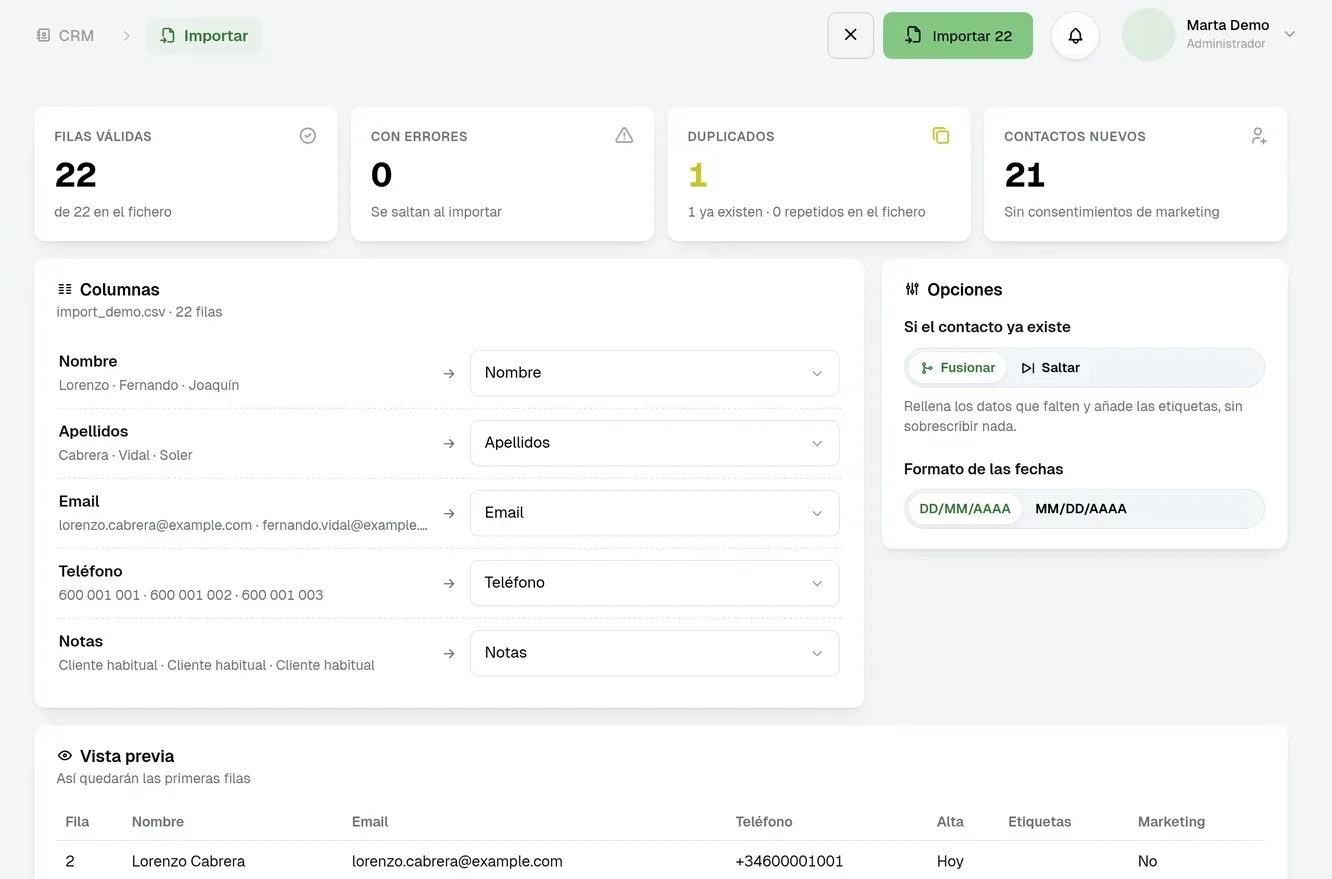
At Teraliv, migration is part of the setup. You export your clients and appointments from your current program or platform as an Excel or CSV file, and we import them with the dashboard's importer: it reads the file, suggests what each column is, merges duplicate clients and shows a preview before you confirm. If something doesn't look right, the import can be undone.

Future appointments come in confirmed and without notifying your clients, so nobody gets unexpected emails. While your team gets used to it, you can keep your old system running for a few days.
Switching software

We bring your data over and you keep going

This is how everything looks in Teraliv on day one.

  1. Records with their history from your previous software.

  2. Nobody loses their slot.

  3. Turn on the widget and you are done.

Switching software

We bring your data over and you keep going

This is how everything looks in Teraliv on day one.

Your clients, imported

Records with their history from your previous software.

Your future appointments, in the calendar

Nobody loses their slot.

Bookings from day one

Turn on the widget and you are done.

What we migrate

What we bring over from your previous software

  • Clients with name, phone, email and notes
  • Upcoming appointments, with their professional and service
  • Services with their duration and price
  • Professionals, schedules and locations
  • Duplicate clients merged into a single profile
  • Excel or CSV files of up to 20,000 rows

How we do it

Switching programs, step by step

  1. You export your data

    You download your clients and appointments from your current software. If you're not sure how, we'll guide you.

  2. We import it

    We check the file, match each column and import it. Upcoming appointments come in confirmed and without notifying your clients.

  3. We set it up with you

    Services, schedules, professionals and permissions, just the way you work today.

  4. Both run side by side for a few days

    You can keep your old system for a few days while your team gets used to Teraliv.

  5. You start with Teraliv

    You turn on online booking on your website and social media and cancel your old software.

Try it

Upload a file and see what gets imported

Preview, duplicates and confirmation, before anything changes.

Source

Choose where your data comes from.

Switch management software: no typing anything in by hand

01Importer

No typing anything in by hand

The importer reads your file, suggests what each column is and shows you how many clients and appointments will be created before you confirm. If something doesn't look right, the import can be undone.

  • Preview before importing
  • Duplicate merging
  • Reversible import
Switch management software: your services and your team, just as they are today

02Setup

Your services and team, just as they are today

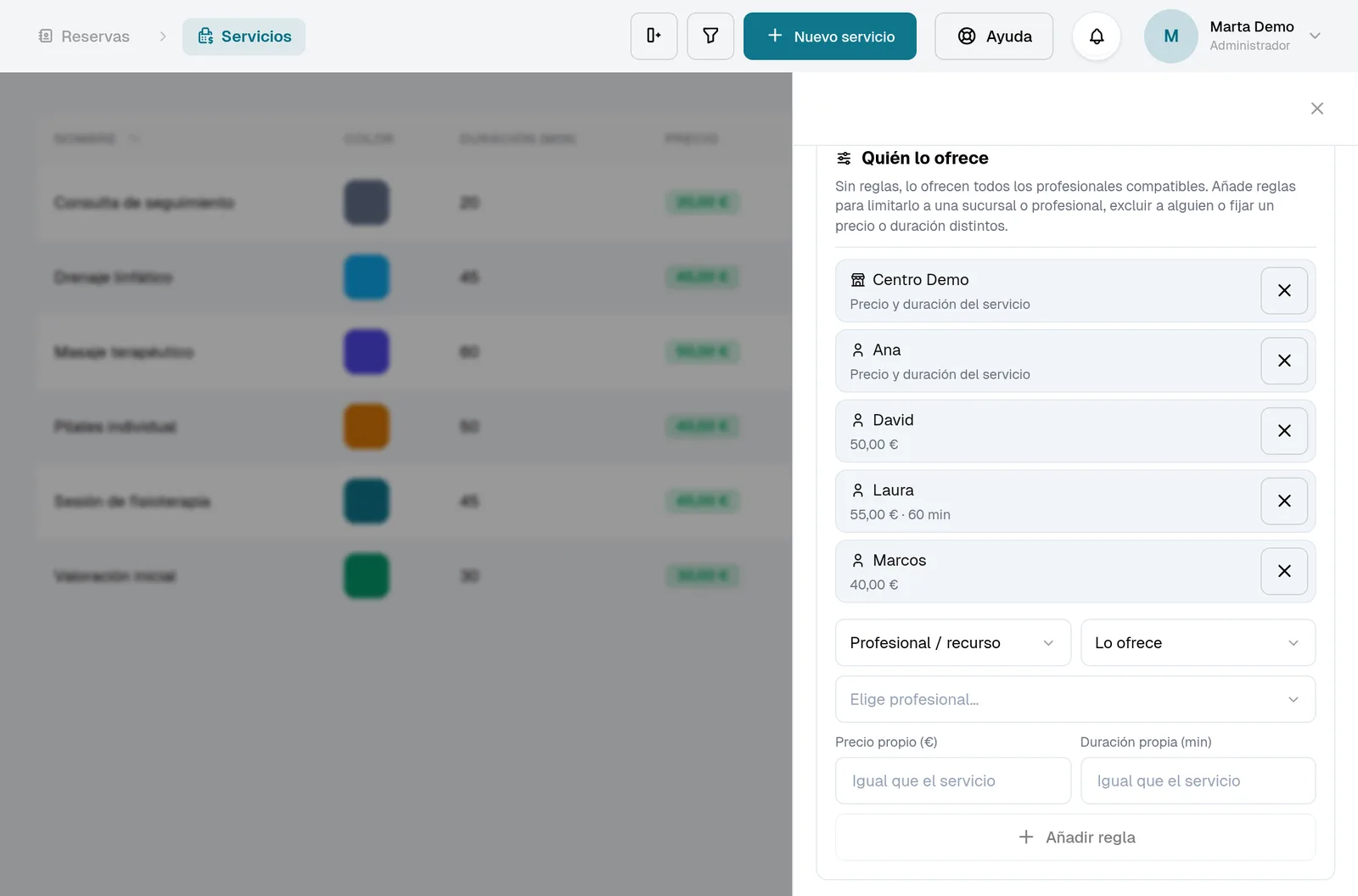
We add your services with their duration and price for each professional, each person's schedule and your location's closures.

  • Price and duration per professional
  • Staff schedules and work calendar
  • Role-based permissions

Before you start

What you need to have ready

  • A file with your clients
  • A file with your upcoming appointments, if your software allows it
  • Your list of services with duration and price
  • Your team and each person's schedule
  • Your locations, if you have more than one
  • Your logo and colours, for your website and emails

Example

A week to switch, step by step

  1. 01

    Day 1 · Kick-off video call

    We look at how you work, which software you use and what data you want to bring over.

  2. 02

    Day 2 · You export your data

    You download your clients and appointments from your current software. If you're not sure how, we'll guide you.

  3. 03

    Day 3 · We import and set up

    We import clients and appointments and add your services, schedules and professionals.

  4. 04

    Day 4 · Your team tries it out

    We show your team the calendar, the checkout and clocking in.

  5. 05

    Day 5 · You turn on online booking

    You add the booking link to your website and social media.

Tips for an easy switch

Pick a quiet week for the switch and let your team know in advance. A few hours of training on the calendar, the checkout and clocking in is usually enough for everyone to feel comfortable.

Review your list of services before importing it: it's the best time to tidy up names, durations and prices that have piled up over the years.

If your current software lets you export upcoming appointments, import them so nobody has to enter them again. And if your clients used to book on another platform, change the link on your website and social media on the same day you go live with Teraliv.

FAQ

Questions about switching programs

It's included in the €79 setup fee, along with the initial setup of your account.

It depends on your data and your team, but you can usually start working with Teraliv within a few days.

From any software or booking platform that can export to Excel or CSV. The importer has a direct mode for exports from one of the most widely used booking platforms and a generic mode for everything else.

Imported appointments are created without sending notifications, so your clients won't receive anything until you want them to.

The importer detects duplicates and merges them into a single profile.

Yes. If something doesn't look right, you can undo the import and Teraliv restores any data that was changed.

Up to 20,000 rows per file, and you can import several files.

Yes, for the first few days you can keep your old system while your team gets used to Teraliv.

No. You can keep it for a few days while your team gets used to Teraliv, and change your booking link when you're ready.

Yes. If you're not sure how to download your clients and appointments, we'll guide you step by step during the migration.

Shall we help you switch?

Tell us which software you use now and we'll explain how to bring your data over.

© 2026 Teralivcontact@teraliv.com