Time off & holidays

Staff holiday management with no clashes or forgotten requests

With Teraliv's staff holiday management, your team requests days off from their mobile, you approve them in one click and the calendar blocks those days automatically. No lost messages, no wall planners.

  • Request and approval
  • Calendar blocked automatically
  • Remaining days always up to date
Team holiday and absence calendar

Organise holidays without leaving your business short-staffed

In a small team, two people on holiday at the same time can mean a week of appointments you can't fit in. And when requests arrive by WhatsApp, it's easy to forget one or lose track of how many days each person has left.

With Teraliv, each person requests their holidays or time off from their phone, attaches a supporting document if needed and their manager approves or rejects it. The team calendar shows clashes at a glance and, once an absence is approved, the calendar and online booking stop offering that person on those days.

Each person's holiday days and hours bank are calculated automatically and linked to time tracking.

Absences and holidays

Holidays approved, calendar up to date

This is how it looks in the panel, step by step.

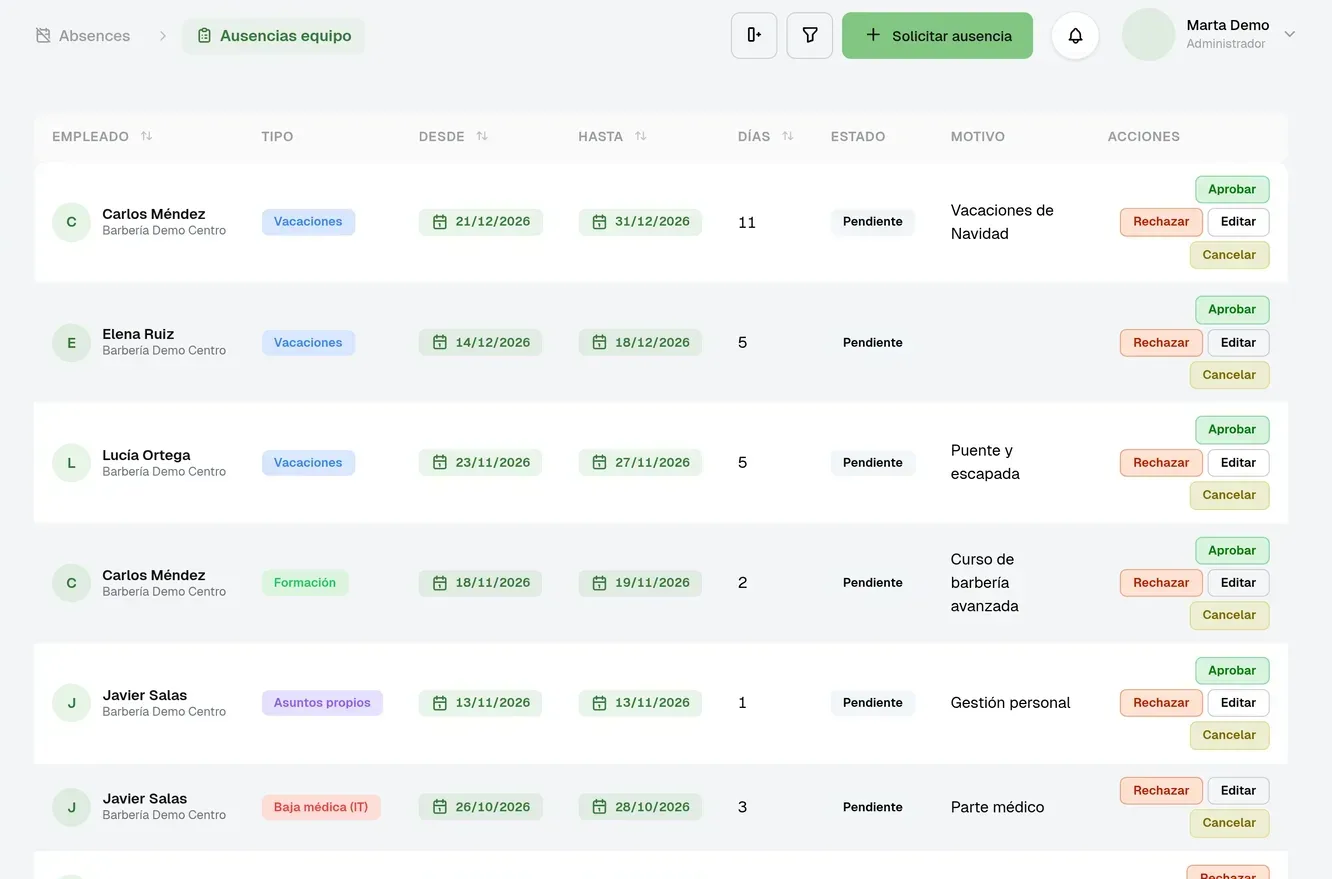
  1. Holidays, sick leave and permits for the whole team.

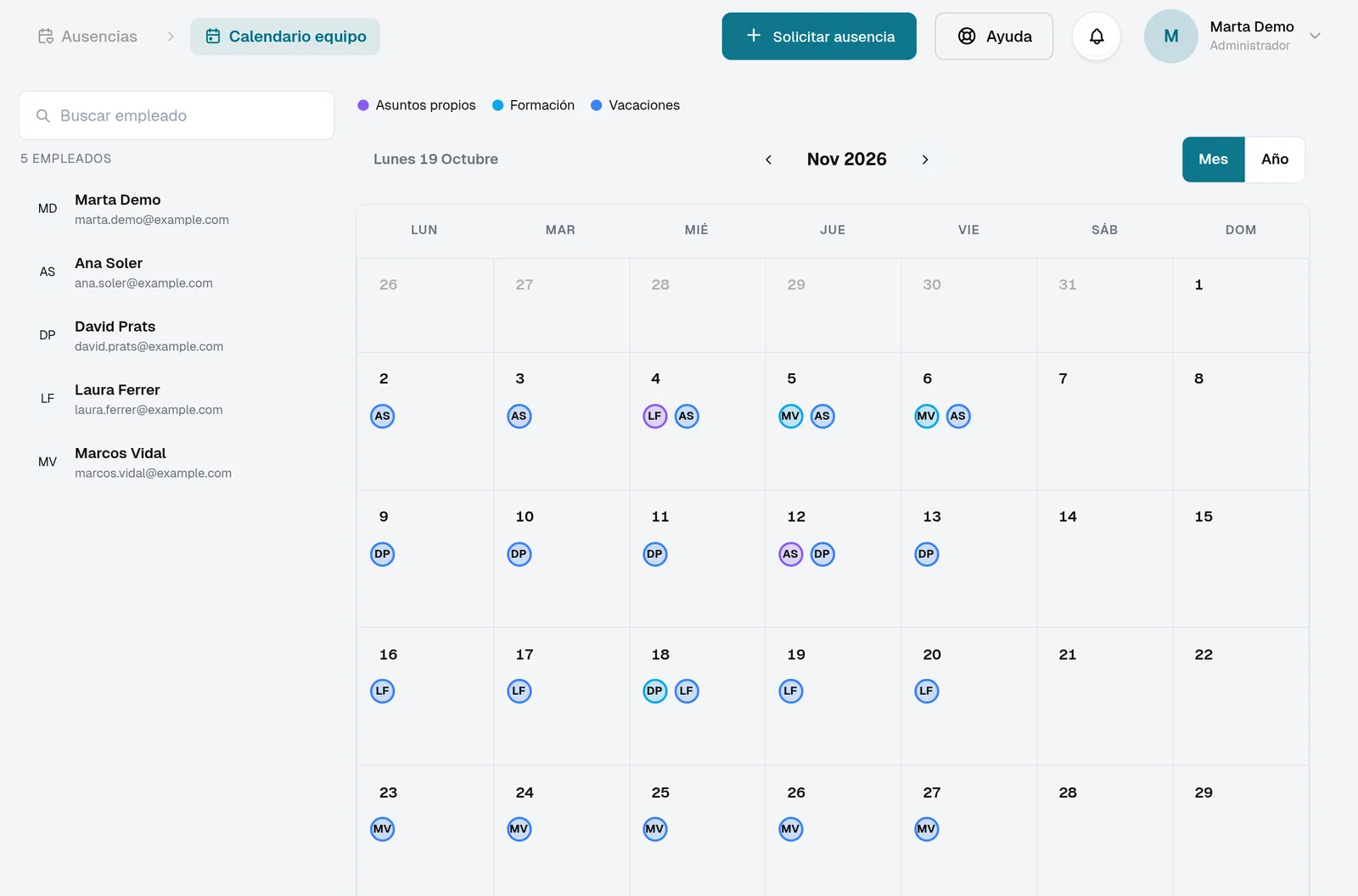
  2. See instantly who covers each day.

  3. Nobody books with someone on holiday.

Absences and holidays

Holidays approved, calendar up to date

This is how it looks in the panel, step by step.

One calendar for everyone

Holidays, sick leave and permits for the whole team.

Shifts without clashes

See instantly who covers each day.

The calendar blocks itself

Nobody books with someone on holiday.

Before and after

Holidays and absences under control

Without Teraliv

  • Requests on WhatsApp that get lost
  • Two people on holiday at the same time
  • Appointments booked with someone who isn't in
  • Remaining days nobody can keep count of
  • Paper supporting documents
  • Sick leave that doesn't show up in the calendar

With Teraliv

  • Requests with their status: pending, approved or declined
  • A team calendar to spot clashes
  • The calendar and online booking respect absences
  • Remaining days and hours bank for each person
  • Supporting documents attached to the request
  • Open-ended sick leave that blocks the calendar

A typical day

A day in your business with time off and holidays

  1. 01

    Monday · Someone on the team requests holidays

    From their phone they pick their dates in August and send the request. They can see how many days they have left.

  2. 02

    Monday · You check the calendar

    In the team calendar you check that nobody else is off during those weeks.

  3. 03

    Tuesday · You approve in one click

    The request is approved, the person is notified and the calendar blocks those days.

  4. 04

    Thursday · Unexpected sick leave

    You record open-ended sick leave with its supporting document. The calendar stops offering that person until they're back.

  5. 05

    December · Closing the year

    Remaining days carry over to the following year if you've set it up that way.

Try it

Request a few days off and approve them

And watch the calendar block itself.

August 2026Holiday
Days left22
AAna's request
Days chosen: 0

Tap the days you want to request.

Features

What's included in Time off & holidays

Team holiday calendar showing who's off at a glance

01Team calendar

Team holiday calendar showing who's off at a glance

A calendar with the whole team's holidays, personal days and sick leave, with a colour for each type of absence.

  • Month and year views
  • Customisable absence types
  • Who's off today
Requesting holidays from a mobile

02Requesting days off

Requesting holidays from a mobile

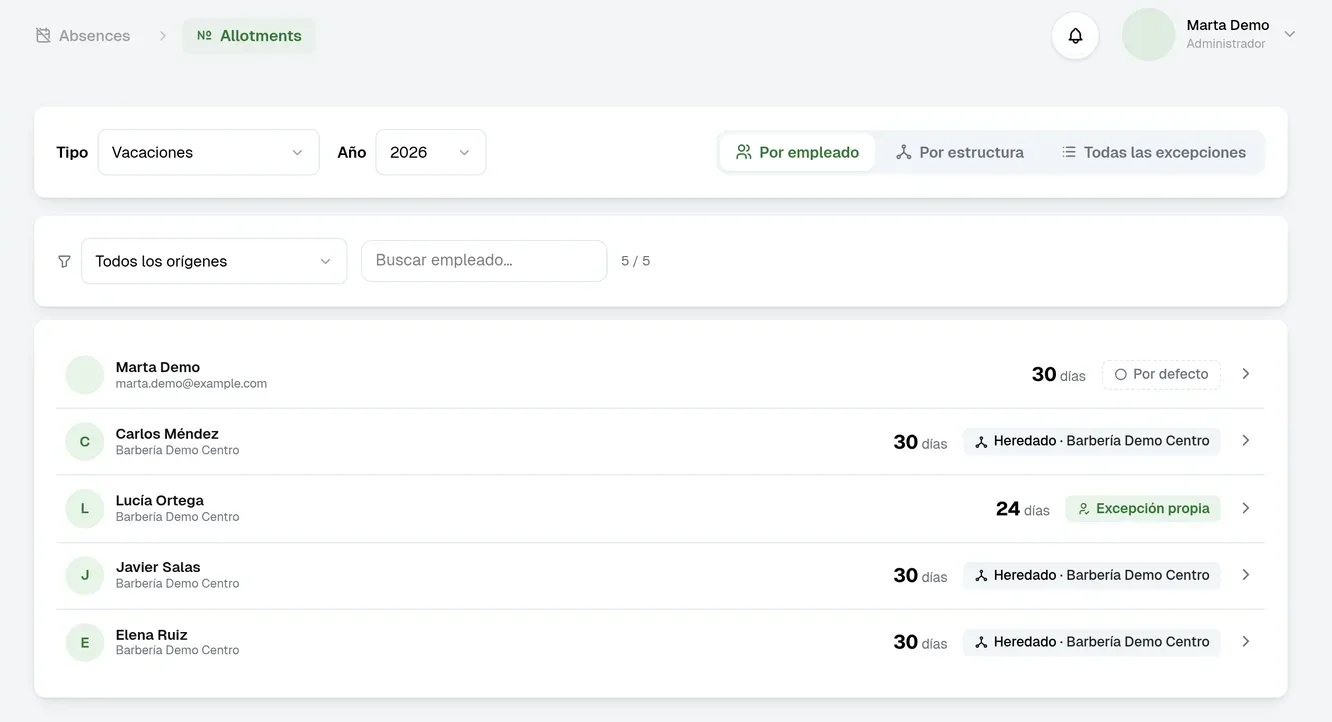
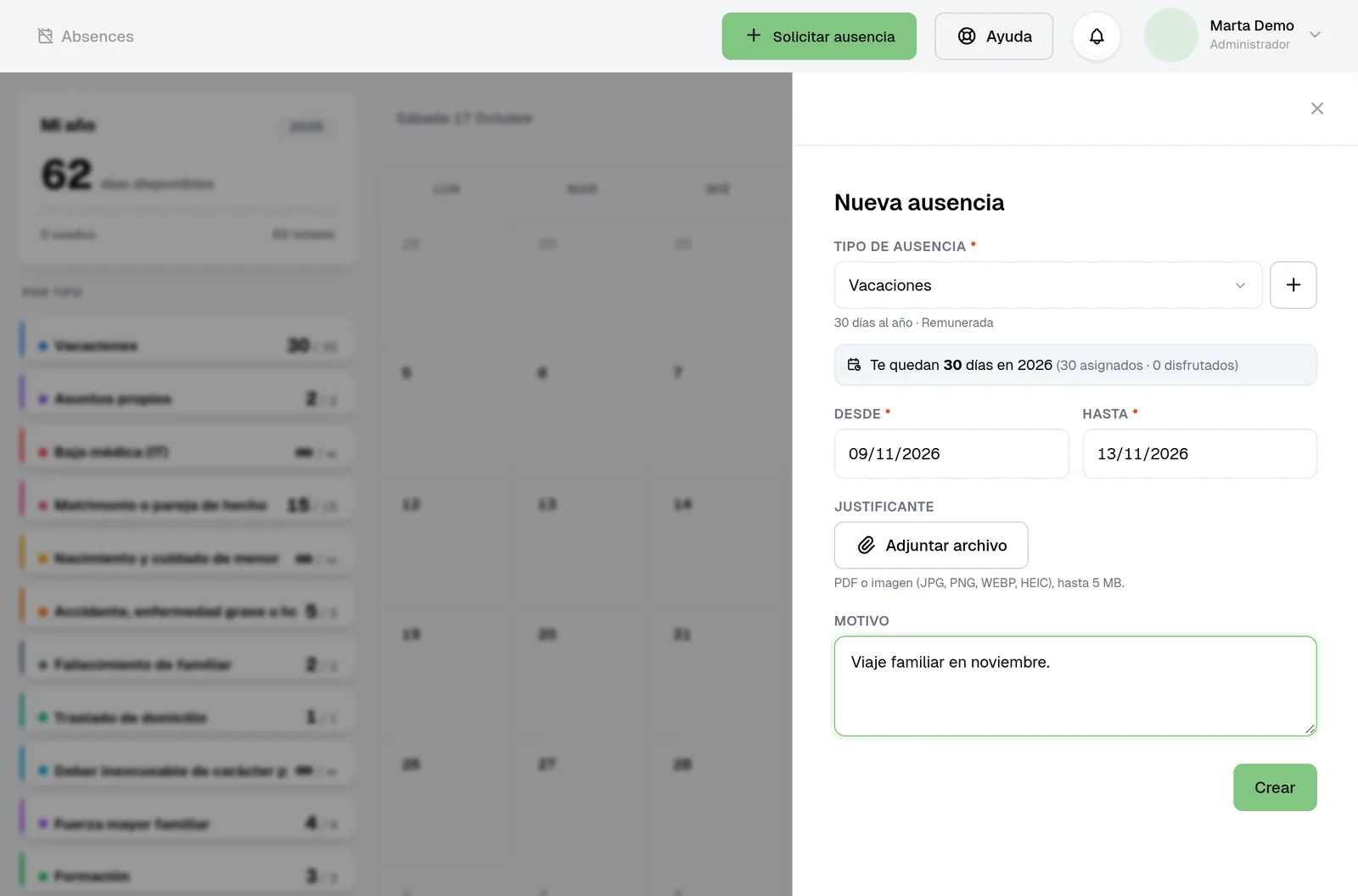
Each person chooses the type of absence and the dates, sees how many days they have left and attaches a supporting document if needed.

  • Remaining days in view
  • Attached supporting documents
  • Notification to their manager
Approving or declining a holiday request in one click

03Approvals

Approving or declining a holiday request in one click

Managers see their team's pending requests and approve or decline them. Everything is logged.

  • Pending and resolved requests
  • Approval by manager
  • History for each person
Remaining days and hours, always clear

04Days and hours bank

Remaining days and hours, always clear

Set each person's holiday allowance and hours bank. Teraliv deducts what's used and, if you want, carries anything left over to the following year.

  • Allowances per person
  • Carry-over of remaining days
  • Working calendar per location

And also

More staff holiday management features

Absence types

Holidays, personal days, sick leave or any others you need, each with its own colour.

Supporting documents

Attach the document to the request.

Open-ended leave

Record sick leave with no return date.

Carry-over

Remaining days move to the following year.

Managers

Each manager approves their own team.

Calendar blocked

Approved absences block appointments.

Tips for managing your team's holidays

Ask your team to request holidays in advance and always through Teraliv. With every request on the team calendar, you see clashes before approving and avoid being short-staffed on your busiest days.

Set up the types of absence you actually use: holidays, personal days, sick leave or other leave. Giving each type its own colour makes the calendar easy to read at a glance.

Set each person's holiday allowance at the start of the year and decide whether unused days carry over to the next. That way nobody has to count by hand how many days they have left.

Remember that an approved absence blocks the calendar and online booking. If someone comes back early from sick leave, just close the absence and they'll appear in the calendar again.
Time off: €1 a month per person

Requests, approvals and holiday allowances for €1 a month per person, on top of the Team module. Prices exclude VAT, no long-term contract.

FAQ

Questions about Time off & holidays

Yes. An approved absence stops anyone booking with that person, including through online booking.

Yes. Holidays, personal days, sick leave or any others you need, each with its own colour and rules.

The managers you choose, based on their role and location.

Yes. When requesting an absence they see their remaining days, and their profile shows a summary for the year.

It's each person's hours balance: the hours they've worked above or below their contracted hours, calculated from their clock-ins.

Yes. You can set remaining days to carry over to the following year.

You assign each person's days for the year, either across the board or with exceptions, and Teraliv deducts approved days and shows you what's left.

Yes. The absences dashboard shows who's off today and over the next few days, and the team calendar shows the whole month or year.

Yes. You can record sick leave, even with no end date, along with its supporting document. The calendar blocks that person until the leave is closed.

Shall we talk about your business?

Tell us how many of you there are and what you need, and we'll put together a quote. If you like, we can show you Teraliv on a 20-minute video call.

© 2026 Teralivcontact@teraliv.com