Files & e-signature

Digital document signing for your team, without printing a thing

Teraliv adds digital document signing for employees, folders with version history and links to receive files. Contracts, protocols and internal rules signed from a phone.

  • Sign from a mobile
  • Links to receive files
  • Everything organised
Business document folders in Teraliv

Goodbye to paper folders

Contracts, protocols, internal rules, supplier invoices, photos of your premises: every business generates lots of documents, and they usually end up scattered across drawers, phones and emails.

With Teraliv you keep them in folders with permissions and versions, and when you need your team to sign something, you upload the PDF, choose who has to sign it and each person signs from their phone with a one-time code. Teraliv adds an evidence sheet and stores the sealed document.

If you need a client, your accountant or a supplier to send you a file, you send them an upload link and the document goes straight into the folder you choose, without them having to sign up. The document manager costs €9 a month with 10 GB: see pricing.
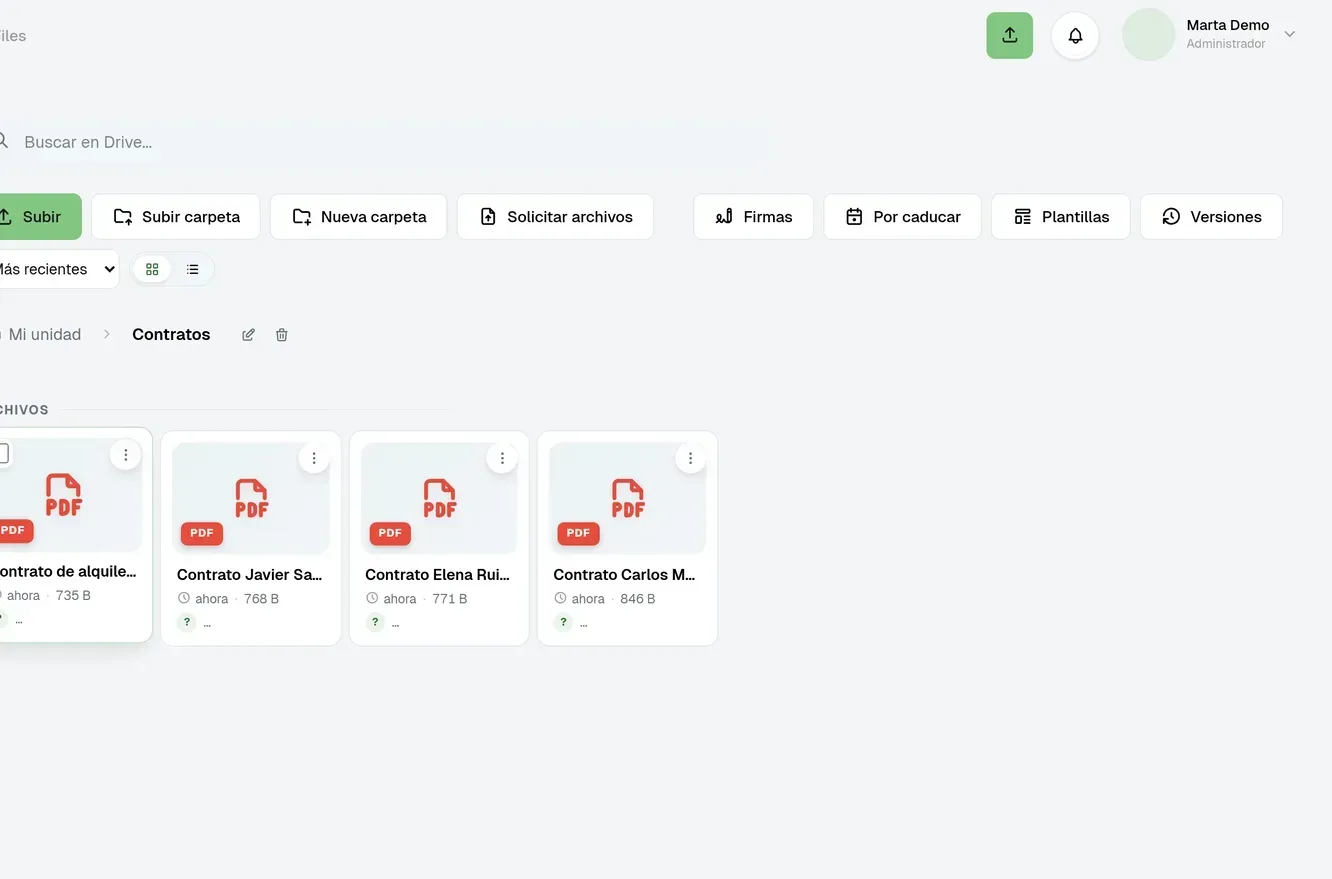
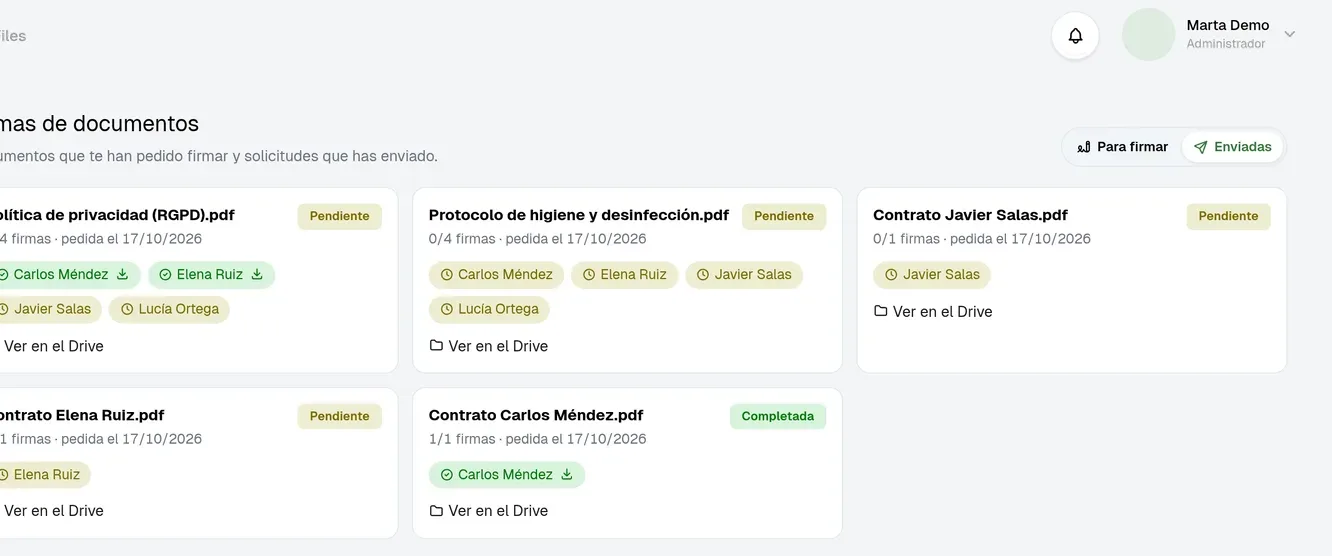
Files and signature

Documents organised and signed without printing

This is how it looks in the panel, step by step.

  1. Contracts, protocols and consents in their place.

  2. Everyone signs from their phone.

  3. Consents stored in their record.

Files and signature

Documents organised and signed without printing

This is how it looks in the panel, step by step.

Everything in folders

Contracts, protocols and consents in their place.

Team signatures

Everyone signs from their phone.

Client documents

Consents stored in their record.

Before and after

Documents organised and signed

Without Teraliv

  • Contracts and protocols signed on paper and filed away in boxes
  • Documents requested on WhatsApp or by email that go missing
  • No idea who on the team has read the new rules
  • Files scattered across computers and phones
  • Old versions mixed up with new ones
  • Print, sign, scan

With Teraliv

  • Your team signs on their mobile with a one-time code
  • You send a link and the file lands in the right folder
  • You know who has signed and who hasn't yet
  • Documents organised in shared folders
  • Version history for every document
  • Evidence sheet added to the signed PDF

A typical day

A day in your business with files and e-signature

  1. 01

    Monday · You update a protocol

    You upload the new version of the PDF to the protocols folder. The previous one is kept as an older version.

  2. 02

    Monday · You ask the team to sign

    You choose the four people who need to sign it and Teraliv lets them know.

  3. 03

    Tuesday · They sign from their mobiles

    Each person opens the document, signs with their finger or taps «I accept», and confirms with a code.

  4. 04

    Wednesday · Your accountant sends you a document

    You'd sent them an upload link; the file arrives in the accountant's folder and we let you know.

  5. 05

    Thursday · You check the status

    You see the document has been signed by everyone and download the sealed PDF with its evidence sheet.

Features

What's included in Files & e-signature

All your business documents in one place

01Files

All your business documents in one place

Organise contracts, supplier invoices, protocols or photos in folders shared with your team, with permissions and version history.

  • Folders and permissions
  • Version history for every document
  • Access from any device
Digital document signing from a phone in a minute

02Document signing

Digital document signing from a phone in a minute

Upload the PDF, choose who has to sign it and each person signs from their mobile with a one-time code. Teraliv adds an evidence sheet and stores the sealed document.

  • Sign by drawing or by accepting
  • Evidence sheet in the PDF
  • Status of each signer
Receive files without anyone having to sign up

03Upload links

Receive files without anyone having to sign up

Create a link so a client, your accountant or a supplier can upload documents or photos for you. They go straight to the folder you choose and we let you know.

  • Link with an expiry date and optional password
  • File number and size limits
  • Notification when something is uploaded

And also

More document and e-signature features

Versions

Every document keeps its previous versions.

Permissions

Decide who can see each folder.

Sealed PDF

The signed document can't be altered.

Automatic cancellation

If the original changes, the signature request is cancelled.

Password-protected links

Protect upload links with a password.

File types

Links only accept the file types you allow.

Ideas for using files and e-signature in your business

Upload your hygiene protocols, house rules and product manuals to a folder, and ask your team to sign them whenever there's a new version. That way you know who has read them and you have the signed document with its evidence sheet.

Keep each team member's contracts and paperwork in their own folder, with permissions so only the right people can see it.

Use upload links to receive documents without chasing them on WhatsApp: a supplier's invoices, paperwork from your accountant or the photos a client sends before a service. You can give the link an expiry date and a password.

Make the most of version history: when you update a document, the previous version is kept and any pending signature request on the old document is cancelled, so nobody signs something out of date.

Document manager: €9 a month with 10 GB

Folders, upload links and document signing for €9 a month with 10 GB, plus €8 for every extra 10 GB, whatever the size of your team.

FAQ

Questions about Files & e-signature

The people on your team who have access to Teraliv. They sign from their mobile with a one-time code and the signed PDF is stored sealed.

Teraliv stores the signed document with an evidence sheet recording who signed and when. For documents with special legal requirements, check with your adviser.

Yes. You send them an upload link and the files arrive in the folder you choose, with no need for them to create an account.

You can limit the number and size of files. Links never accept web pages or SVG images.

On Teraliv's servers in the European Union, with access based on your team's permissions.

The document manager costs €9 a month with 10 GB and €8 for every extra 10 GB, whatever the size of your team.

Yes. You can create a folder for each team member and set permissions so only they and their managers can see it.

Each signature request shows the status of every signer: pending or signed, with the date. Once everyone has signed, the document is marked as completed.

No. Signing is done in the mobile browser using the link each person receives, with nothing to install.

Shall we talk about your business?

Tell us how many of you there are and what you need, and we'll put together a quote. If you like, we can show you Teraliv on a 20-minute video call.

© 2026 Teralivcontact@teraliv.com